
Take the payment they want to give.
Cash, dynamic QR and split payments close the same way and land in the same report — with transaction history and daily reconciliation behind them.

Every route, one ticket.
Sales processing supports multiple payment options, including dynamic QR — the ticket closes identically whichever the customer picks.

Payments you can follow afterwards.
Transaction history records amount, date, time and method, so a query two weeks later has an answer.
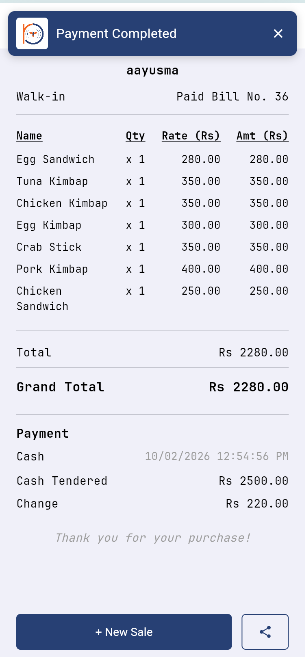
- 01The bill number and who it was for
- 02Every line, with its rate and amount
- 03Method, time, tendered and change
Close the day with the till agreeing.
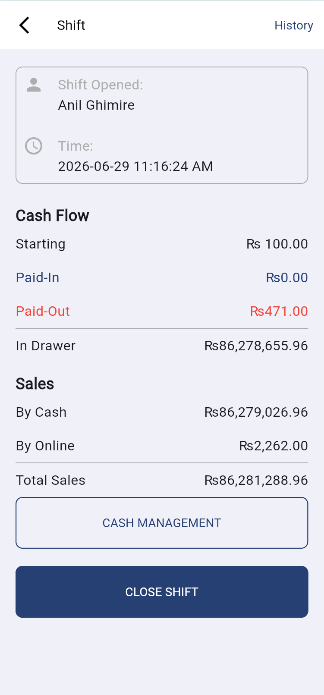
Daily totals, paid in and paid out sit together, so the drawer and the report can be checked against each other before you lock up.
One record, cloud-backed.
Payment records are stored in the cloud with the rest of your data, so the history survives the device it was taken on.

The drawer and the report, side by side.
Daily reconciliation puts income against expenses with paid in and paid out beside them, and tax applied and recorded. Refunds are handled against the original sale, and every transaction carries the staff account that took it.
See the plans →A payment end to end
Total
Method
Confirm
Reconcile
Payments questions.
Sales processing supports multiple payment options, dynamic QR among them, and a bill can be split across the table. The ticket closes identically whichever route the customer picks, with the bill generated at the counter.
Yes. Transaction history records the amount, date, time and method for every sale, along with the staff account that took it, so a query later has an answer.
Daily reconciliation puts income against expenses with paid in and paid out beside them, so the drawer and the report can be checked against each other before you lock up. Refunds are handled against the original sale.
Get paid, and know you got paid.
Start on the free plan, add your items and take your first order today. Move to yearly or lifetime when you need unlimited products and priority support.