
The ordering screen, in your colours.
Set the channel to your own colours and branding, and switch on only the features your counter serves — all of it on the same catalogue the till already keeps.

The palette is yours.
Set the colours the ordering screens use and they carry across the menu, the cart and the confirmation — so the channel looks like the cafe or restaurant it belongs to rather than a stock template.
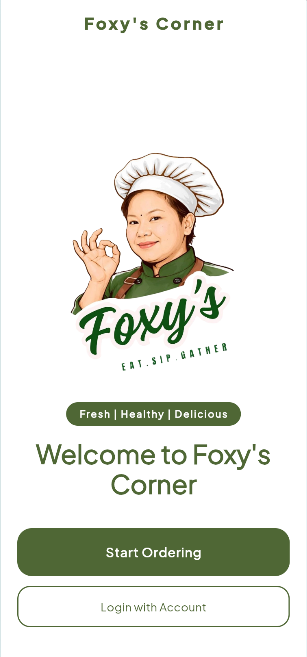
- 01Their name at the top, not ours
- 02Their own logo on the first screen
- 03Their green on the buttons
Your name and mark at the top.
The header carries your identity instead of a generic one, so a customer who scans a code at the table knows whose menu they have opened before they read a single item.

Only what your counter actually serves.
Switch on the parts of ordering you use and leave the rest off the screen, so customers are not offered something the room cannot do.

Dressed differently, fed by the same till.
However the channel is themed, the items, prices and availability come from the catalogue the counter already keeps — so the look changes and the facts underneath do not.

One theme, from the menu to the receipt.
The colours and branding you set carry the whole way through — the menu, the cart, the confirmation — so a customer never drops out of your look halfway through an order. Change it for a season or a refit and every screen follows.
See it for service businesses →
From your link to your kitchen
Theme
Choose
Share
Order
What does Custom ordering mean?
Custom ordering is the ordering channel dressed to your venue: your colours and your branding on the screens customers see, with only the features your counter serves switched on.
It is not a separate ordering system. The menu, the cart and the orders are ReBuzz Ordering; Custom ordering is how that channel is themed, so what a customer opens reads as your cafe or restaurant rather than a stock template. The catalogue underneath is still the one the till keeps, so nothing has to be maintained twice.
Custom ordering questions.
No. Orders placed through your own ReBuzz ordering channel go straight to your counter. There is no per-order fee and no marketplace commission.
Yes. Discounts and offers are set on the item or the ticket in your own account — bundles, time-limited deals or first-order discounts — and can be changed whenever you want.
Yes. The ordering channel reads the products, prices, add-ons and availability you already keep, so a change at the counter is a change online.
Make the ordering screen look like yours.
Start on the free plan, add your items and take your first order today. Move to yearly or lifetime when you need unlimited products and priority support.