
Stock that keeps up with the shop.
Advanced inventory management: products, variants, categories and stock levels that move as you sell, with purchase records behind them.

One catalogue, everywhere it is needed.
Products, variants, categories and prices are defined once and used by the till, the menu and the reports.
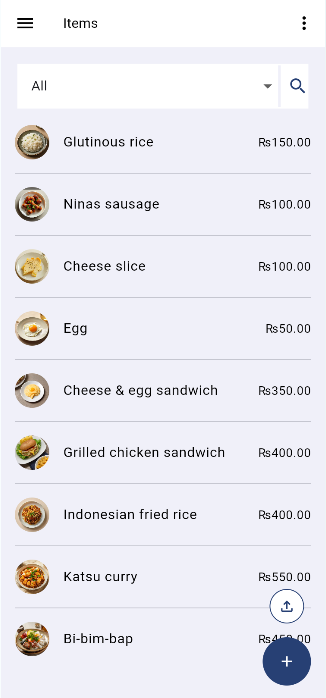
- 01Filter by category
- 02Search the whole catalogue
- 03A photo and a price per item
- 04Add a product from here
Levels move with every sale.
Stock is reduced as items sell and increased as purchases are recorded, so the number on screen is the number on the shelf.

Low stock tells you first.
Low-stock notifications surface the items that need reordering before a customer finds the gap.

Count once, trust it all day.
Because the till, the kitchen and the back office read the same stock record, there is nothing to reconcile at closing.

Count once, trust it all day.
Stock tracking runs per item, with movement history and the purchase records behind it, so what sold and what arrived are both accounted for. Because every channel reads the same record, there is nothing to reconcile when you lock up.
See it for retail →How stock moves
Purchase
Stock
Sell
Review
Where does inventory sit in ReBuzz?
Inventory is the catalogue everything else reads from. The till sells from it, the digital menu publishes from it, and the reports count against it — so a product is defined once rather than kept in three places.
That is why stock moves without anyone updating it: the sale that draws a line down is the same record the back office reads later. The till, the kitchen and the back office see one stock record, cloud-based and visible across outlets.
Inventory questions.
Yes. Sales draw stock down, purchases put it back, and the movement history is kept, so what sold and what arrived are both accounted for.
Low-stock notifications surface an item before a customer finds the gap.
No. Products, variants, categories and prices are defined once and used by the till, the menu and the reports, with tax rules attached to the product itself.
Know exactly what you hold.
Start on the free plan, add your items and take your first order today. Move to yearly or lifetime when you need unlimited products and priority support.